

Playbooks
Playbooks is the reusable prompt library for repeatable operator work. A Playbook stores Markdown content with optional tags so operators can find it later and load it into supported session composers.
Use Playbooks for work that benefits from a consistent starting prompt: endpoint triage, common recovery checks, handoff notes, remote KVM investigation steps, or repeated questions an operator asks Pharaoh during an incident. Do not use a Playbook as a policy approval, a hidden automation grant, or a replacement for organization-wide knowledge that belongs in the IT Knowledge Base.
Where It Lives
Section titled “Where It Lives”Use Playbooks in the Operations navigation group.
The shipped web routes are:
/playbooksfor the Playbooks list/playbooks/newfor creating a Playbook/playbooks/<playbook-id>for Playbook details and editing
When To Create A Playbook
Section titled “When To Create A Playbook”Create a Playbook when operators repeatedly type the same instructions or when a workflow needs a reliable checklist-style prompt before Pharaoh starts work.
Good candidates include:
- standard first-pass endpoint investigation prompts
- common recovery prompts for known application, OS, or network symptoms
- handoff prompts that collect the same endpoint facts every time
- prompts that remind operators which evidence to ask for before taking action
Avoid creating a Playbook when the content is temporary, endpoint-specific, or policy-like. Endpoint-specific facts belong in the endpoint self-healing knowledge document when they are durable and useful for future recovery. Broad support references, procedures, and imported documentation belong in IT Knowledge Base.
Step 1: Start From The Playbooks List
Section titled “Step 1: Start From The Playbooks List”The Playbooks list lets you:
- search by title or content
- filter by tag
- sort by
Last updated,Title A-Z, orTitle Z-A - page through larger result sets
- open an existing Playbook
- create a new Playbook with
New Playbook
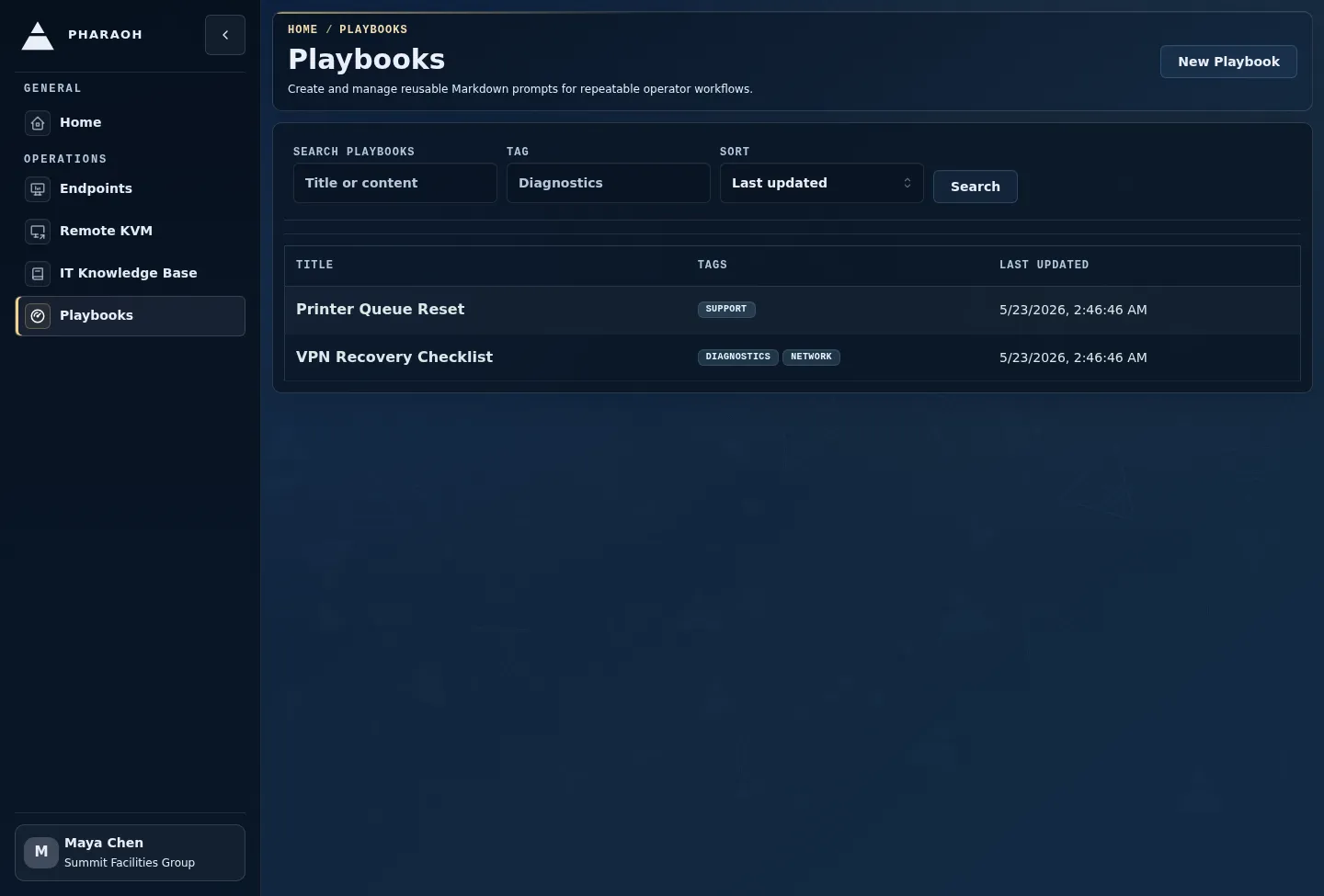
Use the list to decide whether to create a new Playbook or maintain an existing one:
- Create a new Playbook when the prompt does not exist yet.
- Open an existing Playbook when the core workflow should keep the same identity and usage history.
- Duplicate an existing Playbook when a team needs a close variant for a different system, symptom, or risk level.
Use clear titles and tags that match operator language, such as the system, symptom, team, or workflow. This makes the picker useful during an active incident when operators may not remember the exact Playbook name.
Step 2: Open The Detail Editor
Section titled “Step 2: Open The Detail Editor”The detail page lets you:
- edit
Title - edit
Markdown content - add or remove tags
- watch autosave status
- duplicate a Playbook
- permanently delete a Playbook after confirmation
- review
Created by,Last edited by, and usage count
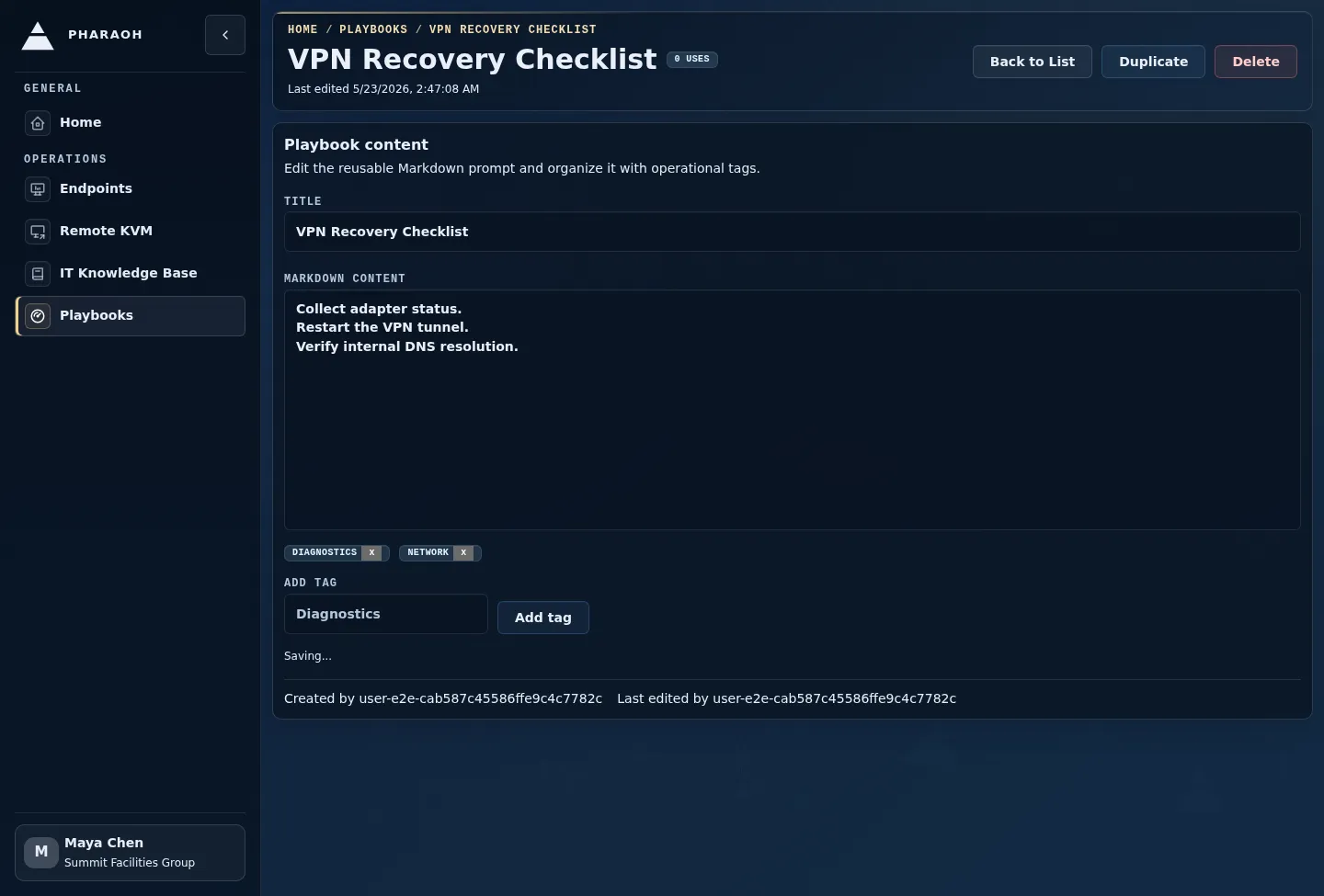
When editing:
- Confirm the title still matches the workflow.
- Update the Markdown prompt body.
- Add or remove tags so the picker remains easy to search.
- Watch autosave status before leaving the page.
- Review
Created by,Last edited by, and usage count before making sensitive changes.
Duplicate a Playbook when you need a close variant for a different team or scenario. Delete only when the prompt should no longer be available to operators; deleting a Playbook does not remove metadata from messages that were already sent.
Step 3: Load A Playbook From A Composer
Section titled “Step 3: Load A Playbook From A Composer”Supported web composer surfaces show Load Playbook:
- Endpoint Session workspace composer
- Remote KVM web session workspace composer
- Agent Core thread composer when that thread composer is user-facing
Load a Playbook when you want to start from a proven prompt instead of drafting from memory. This is especially useful during repetitive triage, shift handoff, or incidents where multiple operators need to ask Pharaoh for the same evidence.
The picker lets you search, sort, select a Playbook, preview its Markdown content, and edit the global Playbook content before loading it. Edits made in the picker autosave the Playbook itself.
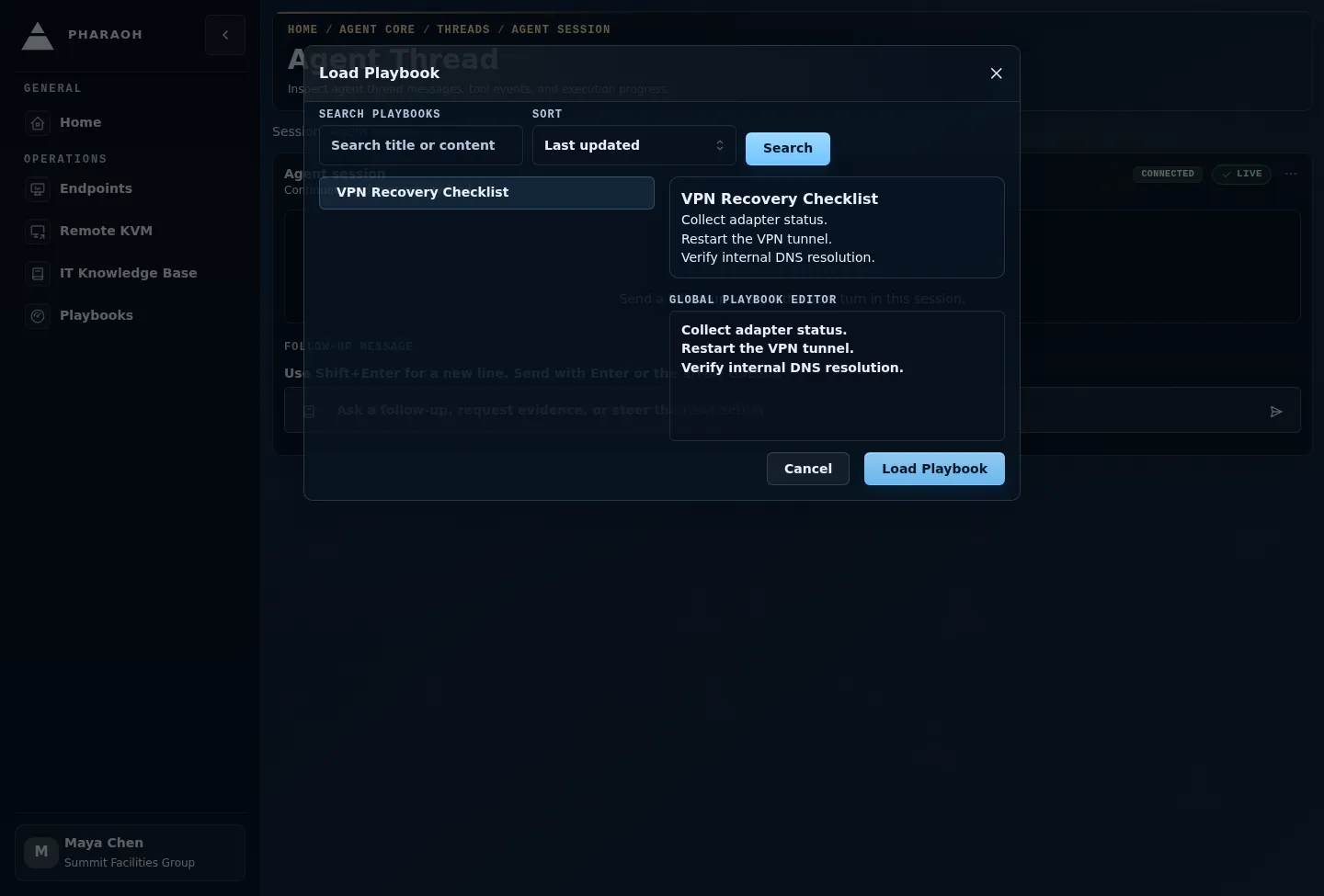
Use the picker this way:
- Search or sort until the right Playbook is visible.
- Select the Playbook and preview its Markdown content.
- If the reusable Playbook itself needs a correction, edit it in the picker and wait for autosave.
- Select
Load Playbook. - If the composer already has draft text, confirm whether replacing it is intentional.
After a Playbook is loaded, edits in the composer are local to the outgoing message or prompt.
Before sending, read the loaded prompt and adjust it for the endpoint, user impact, and current incident. A Playbook is a starting point; the sent prompt should still reflect the actual operational context.
Step 4: Separate Global Edits From Local Edits
Section titled “Step 4: Separate Global Edits From Local Edits”There are two kinds of edits after you choose a Playbook:
- Edits in the Playbook detail page or picker update the reusable Playbook for future operators.
- Edits in the composer change only the outgoing message or prompt.
Use global edits for corrections that should be reused, such as outdated product names, missing evidence requests, or a better checklist sequence. Use local edits for incident-specific facts, endpoint names, user impact, and one-time constraints.
Step 5: Review Usage And Metadata
Section titled “Step 5: Review Usage And Metadata”Usage count appears on the detail page only. It reflects accepted send activity with Playbook context; it is not a count of previews, searches, or picker opens.
Pharaoh increments usage only after a send path accepts a message or prompt with Playbook context. Loading a Playbook, previewing it, replacing draft text, or abandoning a draft does not increment usage.
Use usage metadata as an operational signal:
- high usage can identify prompts worth reviewing, standardizing, or turning into broader documentation
- low usage can identify stale, hard-to-find, or overly narrow Playbooks
- recent edits on a heavily used Playbook deserve extra care because they affect repeated operator workflows
Sent-message metadata records the Playbook reference, whether the sent text changed after loading, and whether the Playbook was updated after it was loaded. This helps reviewers understand whether an operator sent the Playbook as written or adapted it for the situation.
Android Remote KVM
Section titled “Android Remote KVM”Android Remote KVM supports Playbook insertion into the Remote KVM prompt flow. The Android picker can search, preview, load, warn before replacing an existing prompt draft, clear the selected Playbook, and submit Playbook selection context with the prompt.
Native Android Playbook management is not available in this cycle. Create, edit, duplicate, delete, tag management, and usage-count review are web-console workflows.
Boundaries
Section titled “Boundaries”- A Playbook drafts instructions for an operator-controlled send path. It does not approve self-healing escalations or grant permissions.
- A Playbook is not a durable knowledge article. Put reusable support content and organization-wide references in
IT Knowledge Base. - Endpoint Local Web insertion is not supported in this cycle.
- Endpoint-agent Playbook sync and offline Playbook cache are not supported in this cycle.
- Deleting a Playbook does not remove Playbook metadata from messages that were already sent.