

Session Workspace
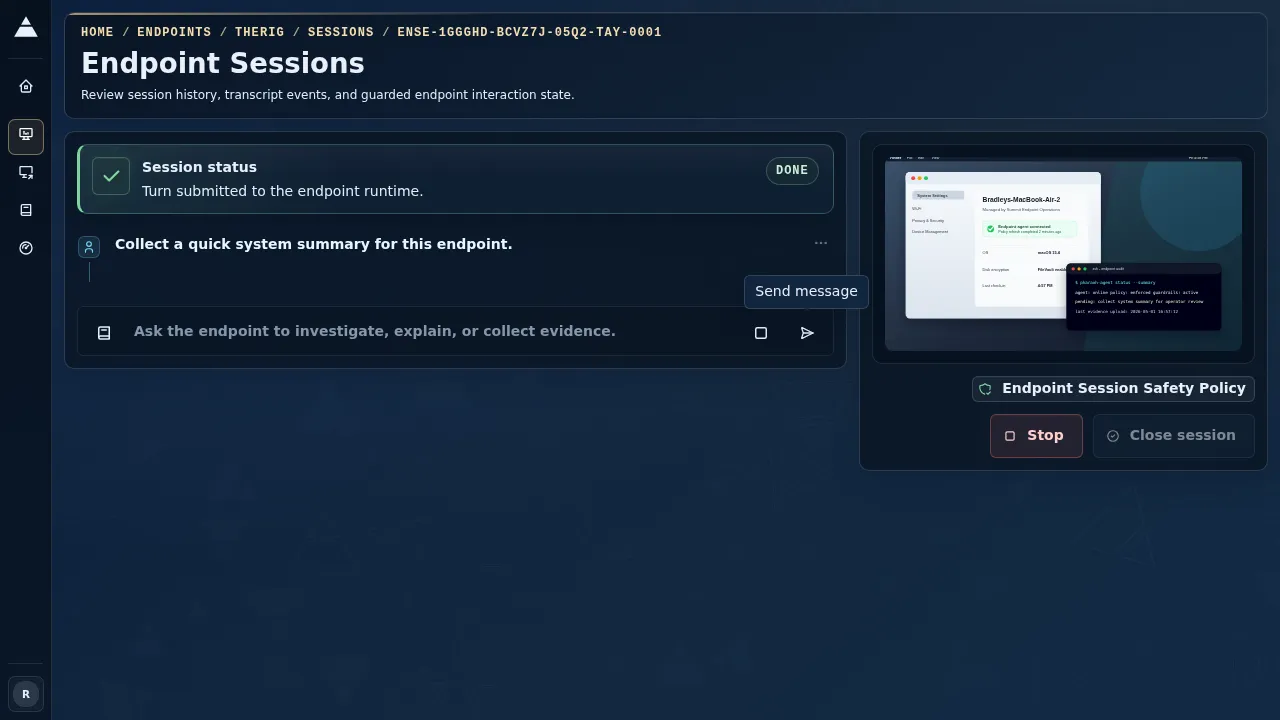
The session workspace is the endpoint-scoped page where operators review turn-grouped conversation history, watch live endpoint evidence, and manage the current session state.
Where It Lives
Section titled “Where It Lives”Pharaoh uses two endpoint-scoped workspace routes:
/endpoints/<endpoint-id>/sessions/endpoints/<endpoint-id>/sessions/<session-id>
The breadcrumb trail keeps the workspace anchored under Endpoints and the current endpoint.
The active-turn layout shows the worklog and live-intelligence regions side by side on wide screens.
Self-healing session links open this same canonical endpoint session workspace. Pharaoh does not fork a separate transcript UI for self-healing sessions; use the self-healing pages for Sentinel context and this workspace for the endpoint session and agent worklog.
When a self-healing or Sentinel workflow completes, the Agent worklog can include a structured-output card. These cards are part of the transcript and survive reloads, stream reconnects, and history replay. Manual custom conversations continue to render as ordinary messages unless the workflow explicitly requested a structured-output contract.
What You See In The Workspace
Section titled “What You See In The Workspace”The layout has two primary working regions:
Live endpoint intelligencefor the latest frame, evidence ledger, safety posture, decision checkpoint messaging, and lifecycle controlsAgent worklogfor turn-grouped conversation history, recovery banners, and composer controls
Live Endpoint Intelligence
Section titled “Live Endpoint Intelligence”The live-intelligence region shows:
- the current transport badge
- the latest live frame when the endpoint is publishing one
- the timestamp of the last frame
- an
Evidence ledgerwith screen, session, and policy evidence chips Lifecycle controlsand any decision-checkpoint guidance when the session is degraded or blocked
If the endpoint does not have an active screenshot yet, the region stays visible and explains that the latest frame is unavailable or stale.
Use this panel as the operational cross-check before asking Pharaoh to change the endpoint. The endpoint, transport, evidence, and policy signals should match the machine and risk level you intended.
Agent Worklog And Recovery
Section titled “Agent Worklog And Recovery”The main workspace area shows one of three states:
- a session-start state with
Guardrail templateandStart Session - an active or historical
Agent worklogfor the selected session - a recovery state when the endpoint or session route is no longer valid
Structured-output card states in the worklog include Sentinel candidate, fixed investigation, false-positive with regeneration recommendation, escalated investigation, validation failure, and unknown-contract fallback. Treat validation-failure and unknown-contract cards as review prompts rather than successful automation outcomes.
When a selected session is missing but prior sessions still exist, Pharaoh shows a Recent sessions card so the operator can reopen an older session without leaving the workspace.
For investigations, keep one session per incident or ticket when possible. Reopen a prior session for continuity when you are reviewing the same issue; start a new session when the guardrail template, operator intent, or endpoint state has materially changed.
Composer Controls
Section titled “Composer Controls”For a writable active session, the operator can use:
Follow-upLoad PlaybookSend turnStop active turnClose session
Pharaoh also explains why actions are disabled when the current session state does not permit them.
Load Playbook opens the reusable Playbook picker. Loading a Playbook replaces the follow-up draft after confirmation when the draft already has text. Backend usage and metadata recording uses the normalized Playbook selection context sent with accepted turns.
Common disabled states are intentional:
Send turnwaits for a non-empty draft and no currently running turn.Stop active turnapplies only while a turn is active.Close sessionwaits until no turn is running.- session-start actions require a selected
Guardrail template.
When To Use This Page
Section titled “When To Use This Page”Open the workspace when you need to:
- start a guarded endpoint session
- review the current worklog
- send a follow-up request
- watch live endpoint intelligence during an active investigation
- reopen a prior session for review
What Success Looks Like
Section titled “What Success Looks Like”The workspace is healthy for IT operations when the endpoint identity matches the target machine, the selected policy is visible in the session header or safety posture, each operator request appears as a turn in the Agent worklog, and lifecycle controls reflect the real session state.